Add a file in a chat context
Give better understanding of your objective and informations to the AI
Last updated About 5 hours ago
Objective: add up to 15 files to the context of a conversation.
Prerequisite: you have access to the relevant conversation. To add files from OneDrive or Google Drive, you have connected the relevant cloud storage service in your personal integrations.
Open an existing conversation, or start a new conversation from the general screen or from a Space.
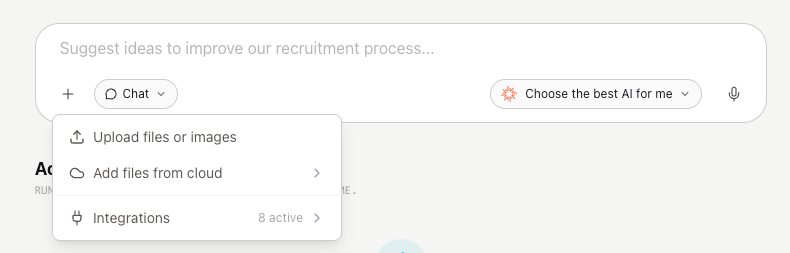
In the message input field, click the + icon.
Choose the file source:
To add a file from your computer, select the local file.
To add a file from OneDrive or Google Drive, select the connected cloud storage service.
Add the files you need, up to the limit of 15 files per conversation.
Send your message so the model can use these files as context.
ℹ️ If you don’t see your cloud service
Make sure OneDrive or Google Drive is connected in your personal integrations, then try again.